
2026-04-16 / Rüdiger Klaehn
QUIC packet rejection in practice
Putting QUIC packet rejection to the test with a real iroh endpoint.
In the previous blog post we have explored the mechanisms QUIC uses to reject packets.
Now we want to see how this works in practice.
The problem
An attacker can cheaply generate valid-looking ClientHello packets and flood an endpoint with them. Completing a full handshake is expensive: it involves crypto, state allocation, and a response over the network. Even a modest stream of fake connection attempts can saturate a server's CPU and crowd out legitimate traffic.
Anyone exposing a p2p endpoint on the internet should harden it against this kind of spam, cloud deployments included. Most existing defenses assume TCP and HTTP, so QUIC endpoints don't get much help from the usual tooling. This post walks through how an iroh endpoint does it, and measures what each rejection option actually costs in practice.
A test handler
We start with an iroh endpoint that serves a simple echo protocol and counts completed requests.
This endpoint runs as a standalone binary. You can configure the endpoint id in the usual way with an IROH_SECRET environment variable. The binary has a CLI argument to shut down after either n total requests (for testing rejection) or n completed requests (for testing handling valid requests).
It will also measure its own CPU time on shutdown, using the cpu-time crate.
Using this we can measure not just the wallclock execution time but also how much load the server was under.
We are interested in how much work a request produces on the server side. This is why we measure request rate in terms of CPU time.
Reference case: just valid requests
To establish a baseline, we just do a number of echo requests in parallel and look at the CPU usage and wallclock time:
echo: 100 accepted, 0 rejected, 0 closed (client: 36.05ms | server: 92.29ms cpu, 1084 ops/s, 240.14ms wall)
So each CPU core can handle 1084 complete new handshakes and echo requests per second in terms of raw CPU time.
Note that these are fresh connection attempts. Also this is with 100 clients running on the same machine, so the absolute number isn't that meaningful. We mostly care about relative numbers.
Adding UDP spam
Now let's imagine our echo service is under load or under a denial of service attack. We will see in which way we can reject incoming connection attempts, and how many we can reject.
Random UDP packets will be rejected very early. So the garbage packets we are using here are valid ClientHellos, the most expensive type of packet that does not require any state tracking from the client (attacker) side.
Rejection opportunities
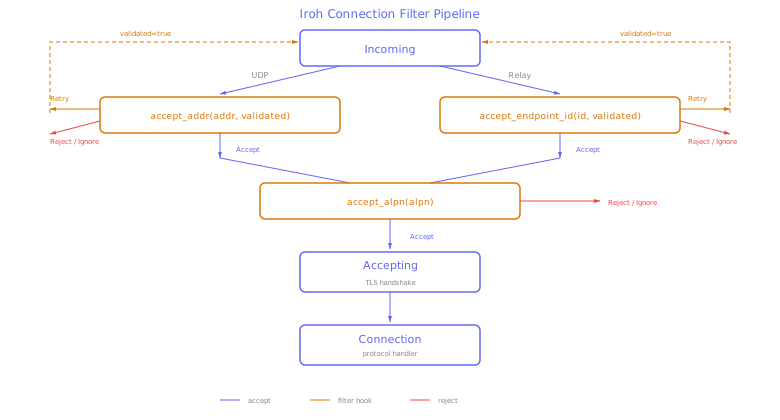
Direct requests
The first incoming datagram will contain an initial packet without retry token. At this point we don't know if the sender address is valid. This is the first opportunity to reject.
The options here are ignore (silently dropping the connection attempt), retry (instruct the sender to retry with a token), and reject. We could reject here based on the unverified sender address, or just to shed load, but usually you want to tell the remote to retry.
           ignore addr:   0 accepted, 100 rejected,   0 closed  (client:   5.00s | server:  2.73ms cpu,    36576 ops/s, 213.98ms wall)
           reject addr:   0 accepted, 100 rejected,   0 closed  (client:  8.41ms | server:  5.46ms cpu,    18312 ops/s, 212.15ms wall)
        retry + reject:   0 accepted, 100 rejected,   0 closed  (client: 35.02ms | server:  9.41ms cpu,    10629 ops/s, 238.97ms wall)
           reject alpn:   0 accepted, 100 rejected,   0 closed  (client:  8.81ms | server:  6.08ms cpu,    16453 ops/s, 212.86ms wall)
Unsurprisingly, ignore is fastest at 36576 ops/s per core. But also not very useful except for unconditional load shedding. We see that the total client runtime is 5 seconds here since each client side connection is waiting for the 5s timeout.
Reject is a bit more polite, but requires more work - sending an actual UDP packet containing a CONNECTION_CLOSE frame. For non-adversarial clients this is better since they get immediately notified that the server is unable for whatever reason to handle the request instead of having to wait for a timeout.
Retry+reject is the first rejection mode that is genuinely useful for selective filtering or rate limiting. After a retry we get a ClientHello with the retry token set, so we know the source address is correct. We can then rate limit by IP address or even filter by region.
Even retry+reject is much faster than going through with the request at ~10629 ops/s per core. Note that for spoofed addresses we never get back a ClientHello containing the retry token, so this is measuring the cost of generating a retry token and sending the retry packet.
The last opportunity to reject direct requests is to reject based on the proposed ALPNs. This is useful not so much in a denial of service scenario, but if you handle different protocols and want to prioritize one in times of high load.
Since the proposed ALPNs are available in the initial packet, this rejection is almost as cheap as the other early filters. The only additional cost is early decrypting of the ClientHello packet.
Filtering on proposed ALPNs is only possible if the proposed ALPNs are actually in the first UDP packet. This is the case for current iroh connections, but might not be the case for connections using a larger handshake, e.g. when using post-quantum handshakes.
Requests via relays
For requests via relays we don't have a source address that we can filter or rate limit on. What we have instead is the endpoint id as reported by the relay.
This id can be relied on only if the relay isn't lying to us, so it is a bit similar to an unverified source IP address. But it is much harder for an attacker to get us to choose a compromised home relay than to just forge the sender in UDP datagrams, so it is a bit more useful for filtering.
            ignore eid:   0 accepted, 100 rejected,   0 closed  (client:   5.01s | server:  3.13ms cpu,    31980 ops/s, 213.10ms wall)
            reject eid:   0 accepted, 100 rejected,   0 closed  (client: 18.11ms | server:  9.47ms cpu,    10561 ops/s, 222.61ms wall)
    retry + reject eid:   0 accepted, 100 rejected,   0 closed  (client: 36.25ms | server: 17.73ms cpu,     5640 ops/s, 242.05ms wall)
           reject alpn:   0 accepted, 100 rejected,   0 closed  (client: 16.34ms | server: 10.49ms cpu,     9529 ops/s, 219.87ms wall)
We can also filter on the proposed ALPNs, which are available in the initial packet just like for direct connections.
Again, this is cheap and comparable to the other early filters.
Combining valid handshakes with spam
The next step is to try to communicate with our echo service while it is being subjected to a denial of service attack. For this test our valid interactions are short, so we measure how many valid handshakes we can perform while being subjected to ClientHello spam.
In this test we spam the echo service binary with 100 fake ClientHello per valid echo request. Each fake ClientHello is valid in isolation, so it will cause the endpoint to respond with a ServerHello that will be ignored.
Spam test: 100 echo requests, client-hello spam 100 pkts/req, filter: no filter

  echo: 107/111 accepted, 4 rejected
  server wall time:            3.14 s
  server cpu time:             0.52 s
  server throughput:            204 ops/s
  spam packets sent:          11100
  server incoming:             2794
  server filtered:             2794
  server completed:             107
  effective spam/request:        25 :1
Not all spam packets actually arrive at the server, several are dropped by the operating system (it is allowed to do this for UDP datagrams).
But even so, we got 25 times as many fake requests arriving at the endpoint than real requests, and nevertheless all valid echo requests are getting through in a reasonable time (245 ops per CPU core per second).
Throughput test
Now let's assume we have an endpoint exposed to the internet that has longer lived active connections. To simulate this we send larger echo requests. We want to measure how big the impact of the spam packets is on the throughput of the valid requests.
The baseline is to just perform a number of large echo requests without spam:
Throughput test: 100 x 1.0MiB echo, 1 concurrent, no spam (baseline), filter: retry + accept
  completed: 100/100, failed: 0
  client wall time: 12.34s
  client cpu time:  9.25s
  throughput: 16.2MiB/s
  server wall time: 12.57s
  server cpu time:  9.21s
  server incoming:   200
  server spam recvd: 0
Then add some ClientHello spam and see how the throughput suffers. For this test the spam rate is per second.
Throughput test: 100 x 1.0MiB echo, 1 concurrent, client-hello spam @ 10000 pps, filter: retry + accept
  completed: 100/100, failed: 0
  client wall time: 15.87s
  client cpu time:  21.14s
  throughput: 12.6MiB/s
  server wall time: 16.08s
  server cpu time:  18.08s
  spam packets sent: 159972
  server incoming:   40242
  server spam recvd: 40042
As you can see, throughput suffers a bit from the spam, but nothing major. Despite the server having to send retry packets for 40042 incoming fake ClientHellos, throughput for the existing connections is still acceptable.
A note on operating systems
This probably goes without saying, but UDP support on macOS is not great. Iroh and noq do everything possible to make sending and receiving UDP packets on macOS fast, by using the batched sendmsg_x/recvmsg_x syscalls. And this is sufficient for iroh endpoints that are under modest load.
But if you want to expose an iroh endpoint that must handle a very high rate of incoming UDP packets, don't use macOS. Linux's UDP stack is much, much better, with recvmmsg/sendmmsg for batched syscalls and UDP GRO/GSO to amortize per-packet overhead.
We do a lot of work in noq to make sure handling UDP spam is cheap, but if there is so much that the operating system has a bottleneck delivering the packets to us there is not much we can do.
Conclusion
We have seen in the previous blog post that QUIC has fine grained mechanisms to reject packets early. In this blog post we have seen that these mechanisms provide significant advantages under adversarial scenarios.
To harden an endpoint, you want to use the retry mechanism to make early rejections easier. To retain low latency under low load you could only use the retry mechanism when under load.
If you use iroh endpoints in production and want to test them under load, please get in touch. We can share the load tool used in this blog post with you and help you harden your iroh endpoints.